 ClassToybox
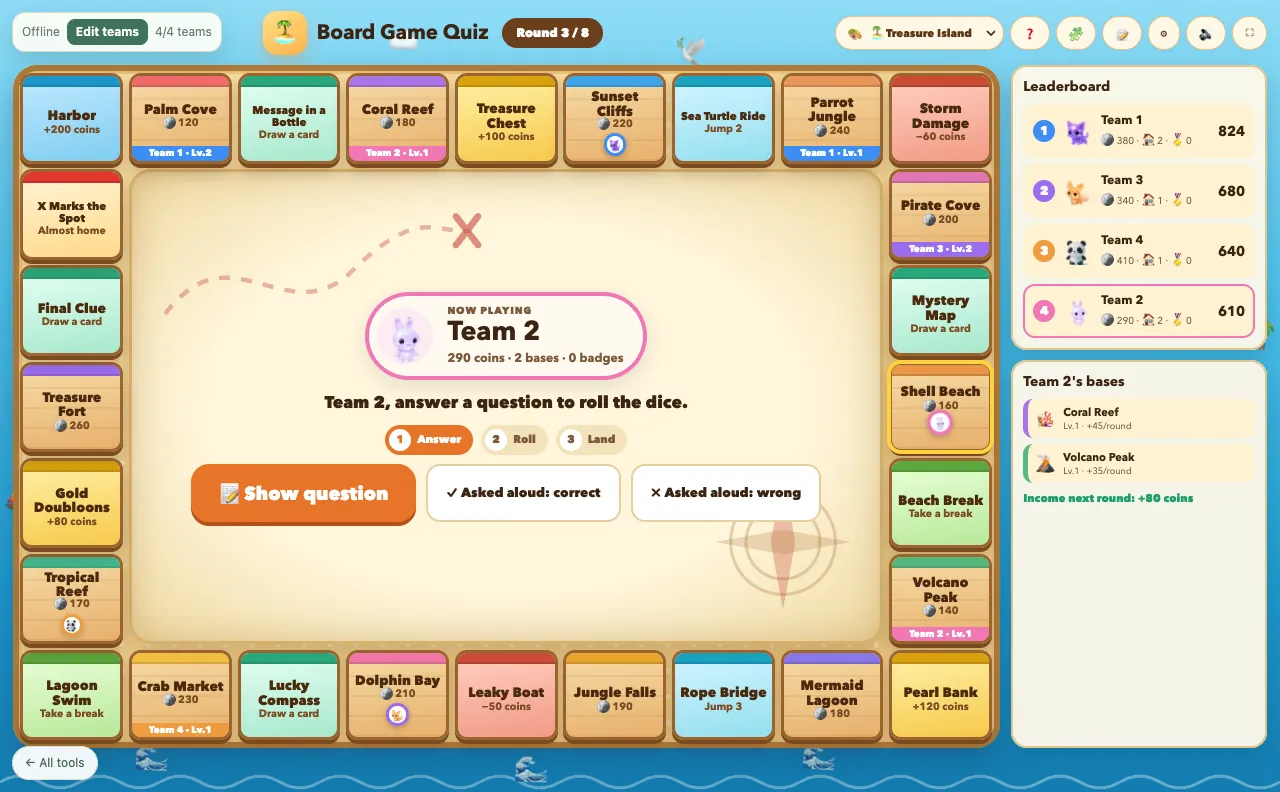
How to use the Board Game Quiz
- Choose a theme: Treasure Island, Space Adventure or Candy Kingdom.
- Set the number of teams (2–8) and rounds (6, 8 or 10).
- Show a question. A correct answer earns 20 coins and lets the team roll.
- Build on empty bases, upgrade your own, and answer a challenge question to visit another team's base for free.
- After the last round, the team with the highest score wins.
Why teachers like it
- Three themes with their own spaces, artwork and event cards
- Edit every base's name, icon, price and income, and write your own event cards
- Use your question sets, a quick typed list, or ask questions aloud
- No bankruptcy or knock-outs, so every team stays in the game
Ideas for your classroom
- Unit review with your own vocabulary on the board
- Friday team challenges
- Any-subject question practice
FAQ
How do I access this tool?
This tool is included in the ClassToybox membership: $4.99 per month or $29.99 per year. Sign in with an active membership to play.
Can I change the board?
Yes. Open Board settings to rename bases, pick an emoji, set prices and income, and edit the event cards. Each theme keeps its own changes.
Do I need questions ready?
No. You can ask questions aloud and tap Correct or Wrong, or use a question set you saved in ClassToybox.